Ask your AI assistant about your visitors
Connect GuestTrack to the assistant you already use. It reads your visitor records to answer, and checks visitors in or out when you ask.
- Claude
- ChatGPT
- Copilot
- Any tool that supports MCP
- Connection type
- Streamable HTTP (remote)
- Sign-in
- OAuth, with your GuestTrack login
- API key
- None needed
How to connect
One address works everywhere. In Claude and ChatGPT you don't even need it: GuestTrack is in their directories.
Claude
In the Claude directory- In Claude, open Customize, then Connectors.
- Search for GuestTrack and click + to connect it.
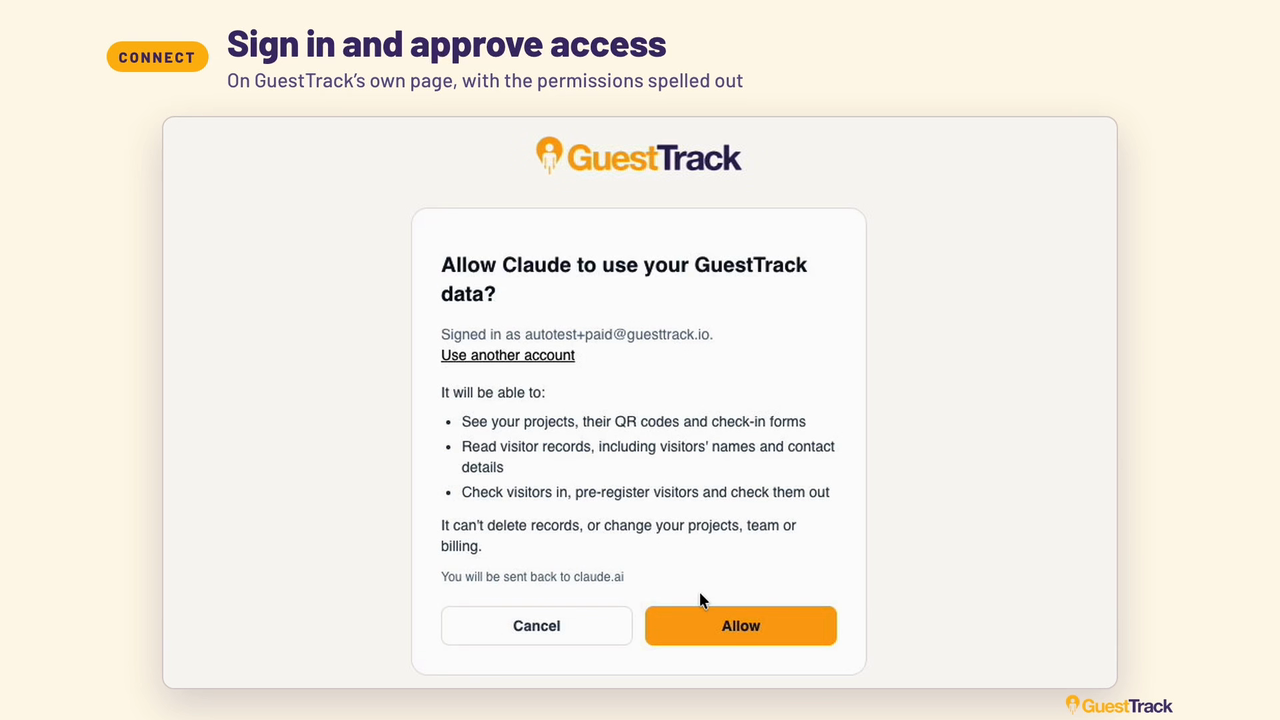
- Your browser opens the GuestTrack sign-in page. Sign in if you need to, check what Claude will be able to do, and click Allow.
- Start a new chat and ask: "List all my projects from GuestTrack."
Nothing to copy or paste.
ChatGPT
In ChatGPT's plugins- In ChatGPT, open Plugins.
- Search for GuestTrack and click Install plugin.
- Your browser opens the GuestTrack sign-in page. Sign in if you need to, check what ChatGPT will be able to do, and click Allow.
- Start a new chat and ask: "List all my projects from GuestTrack."
Nothing to copy or paste. Or go straight to GuestTrack in ChatGPT.
Copilot and every other AI tool
Any MCP clientMicrosoft Copilot Studio, GitHub Copilot, Cursor, Claude Code, or an agent you built yourself.
- Find where your tool adds an MCP server. It is usually called Add MCP server, Custom connector or Tools.
- Choose a remote (HTTP) server and paste
https://api.guesttrack.io/mcp. - Leave the API key empty. The tool opens the GuestTrack sign-in page; sign in and click Allow.
- Ask it to list your GuestTrack projects.
GitHub Copilot in VS Code.vscode/mcp.json
{
  "servers": {
    "guesttrack": {
      "type": "http",
      "url": "https://api.guesttrack.io/mcp"
    }
  }
}Cursor~/.cursor/mcp.json
{
  "mcpServers": {
    "guesttrack": {
      "url": "https://api.guesttrack.io/mcp"
    }
  }
}
Claude Codeterminal
claude mcp add --transport http \
  guesttrack \
  https://api.guesttrack.io/mcp
Can't connect from your tool? Tell us which one and we'll look at it. Building your own integration instead? See the GuestTrack API.
What you can ask
Query visitor records
Who checked in this week?
Was Sam on site on Thursday?
Generate reports
Summarise today's visitors as a spreadsheet.
Check visitors out
Check out all visits for today.
Check in and pre-register
Pre-register Priya for 2pm tomorrow at Front Door.
You approve what it can do
You sign in on GuestTrack's own page, so the assistant never sees your password. The page lists what the assistant will be able to do before you click Allow.
The assistant can
- see your projects, their QR codes and check-in forms
- read visitor records, including names and contact details
- check visitors in, pre-register them and check them out
It can't
- delete records
- change your projects, team or billing
- see projects your own GuestTrack role doesn't let you see
Check-ins an assistant adds count towards your plan's monthly check-ins, and visitors aren't sent a confirmation SMS or email for them. To stop an assistant using GuestTrack, disconnect it in that assistant's connector settings.
Watch an assistant at work
The full walkthrough: connecting GuestTrack, asking who is on site, getting a report, and checking 17 visitors out while the Today page counts down to 0.
Short on time? Watch the 30-second version.